1
Basic Operation
• Music
Short press /VOL- to select the previous title.
Short press /VOL+ to select the next title.
• Volume Control
Long press /VOL- to decrease the volume.
Long press /VOL+ to increase the volume.
• Turn the player On/Off
Press the Play-button to turn the player on/off.
• Play music
Long press the Play-button to start or pause the playback.
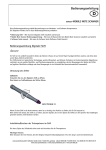
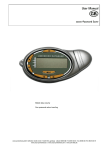
Operation of keys
1. Play-button:
On / Off / Play / Pause
2. /VOL-:
previous title / decrease volume
3. /VOL+:
next title / increase volume
4. Earphone jack / USB-port
5. REC-button:
record / Reset-button
Please note:
Short press: short press the button one time
Long press: press the button 1 to 2 seconds
Music playback
1. Connect the earphones.
2. Long press the Play-button to turn the player on.
3. Select your desired title:
Press /VOL- to select a previous title.
Press /VOL+ to select a following title.
4. Adjust the volume:
Long press /VOL- to decrease the volume.
Long press /VOL+ to increase the volume.
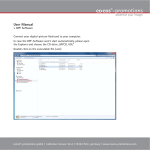
USB-Disk
The player supports standard USB-disk function with the operating systems Windows 98SE / ME (a driver has to be installed),
Windows 2K and above (no driver has to be installed), Mac OS 10.3 and above, Linux Redhat 8.0 and above.
cocos-promotions gmbh | talheimer straße 32-d | 74223 flein, germany | phone 0049 (0) 7131/649 38-0 | fax 0049 (0) 7131/649 38-19
www.cocos-promotions.de | www.cocos-promotions.com | www.usb-sticks.de
2