1
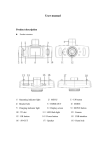
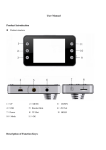
2)REC button Confirmation button for video recording and taking photo; In recording mode, press this mode to start video recording, re-press to stop; In photo mode, short press to take photo. Confirmation button for menu mode. 3)UP button Short press on this button in standby and recording status can zoom out digital. Choose up function in MENU item 4)MODE Short press on this button to shift among “photo mode-Recording mode –playback mode” 5)DOWN button Short press on this button in standby and recording status can zoom in digital. Choose down function in MENU item 6)TF slot Slot for memory card 7)USB data interface Connect PC for Data transfer Connect external power to charge battery or provide working power. 8)Reset slot Use this to restart when crash 9)MIC The tape receiving holes 10)LED flash light Night vision flash light which can be open by short press on “POWER” button. 11)Camera 120°wide-angle Len;