1
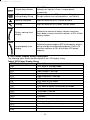
Output Jumpers is not
Check output Jumpers
UPS is on and no power connected correctly
to load
No power on output Check if the LS1 and LS2 are set
receptacle
up from "001 to 000".
Re-charge the battery at least 24
Battery is empty
hours
Backup time is short
Battery aging
Replace Battery
Continuously sounding
The UPS fails
Please contact your local dealer
and display turn to red
The setting mode is not a
please see right configuring method
Buttons does not work right path
Button is Broken
Please contact your local dealer
9. Software Installation
Winpower is UPS monitoring software, featuring user-friendly interface to monitor and
control your UPS. This unique software provides complete power protection for computer
system while power failure. With the software users can monitor any UPS status on the
same LAN. Furthermore, a UPS can provide security protection for more than one
computer on the same LAN at the same time, such as shutting down system in security,
saving application data and shutting down the UPS when power fails.
Installation procedure:
1. Go to the website: http://www.ups-software-download.com/
2. Choose the operation system you need and follow the instruction described on the
website to download the software.
3. When downloading all required files from the internet, enter the serial No:
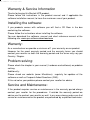
511C1-01220-0100-478DF2A to install the software.
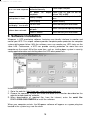
When your computer restarts, the Winpower software will appear as a green plug icon
located in the system tray, near the clock.
15