1
Chapter 18: Sharing Origin Files
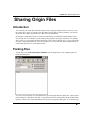
of Origin user who can open your packed file, make a selection from the User Access drop-down list. To
create the packed file, click the Pack button.
Un-packing Files
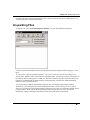
To unpack a file, select Tools:Pack/Unpack OPK Files to re-open the Origin Pack dialog box.
Click the Open button and then select the desired .OPK file from the Origin Pack Files dialog box. Click
Open.
To extract files, simply click the Extract button. (You cannot exclude files from the unpacking process.
All files in the .OPK file will be extracted to the appropriate folder. The file list is used for viewing files in
the .OPK file and for packing files to a .OPK file. The Delete button has no effect on the files that will be
unpacked.) To maintain the file folder structure of the packed files, select the Use Folder Information
check box before extracting the files.
You can also drag a .OPK file from Windows Explorer into your running Origin program window.
Alternatively, you can drag the file onto the Origin taskbar button without releasing the mouse button.
After a few seconds, the Origin program window will become active and you can then drag the file into the
program window. When you use the drag-and-drop method, Origin uses your current "Use Folder
Information" setting to determine if the folder structure of the packed files is maintained.
Un-packing Files • 640