1
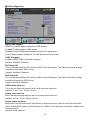
Launch PXE OpROM policy This option controls the execution of UEFI and Legacy PXE OpROM. Options: Do not launch, Legacy only, UEFI only. 5‐7 Security Menu The Security menu allows you to change the system security settings. Password Description If ONLY the Administrator’s password is set, then this only limits access to Setup and is only asked for when entering Setup. If ONLY the User’s password is set, then this is a power on password and must be entered to boot or enter setup. In Setup the user will have Administrator rights. The password must be in the following range: Minimum length 3 Maximum length 20 Set setup Administrator Password. Administrator Password User Password 100 2124 4096 1333 1.152 0.960 1.504 3.200 51
39
Administrator Password If ONLY the Administrator’s password is set, then this only limits access to Setup and is only asked for when entering Setup. The password must be 3 to 20 characters long. User Password If ONLY the User’s password is set, then this is a power on password and must be entered to boot or enter setup. In Setup the user will have Administrator rights. The password must be 3 to 20 characters long. - 21