1
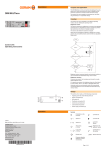
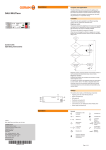
1 Operation 2 Symbols Pushbutton on the lumi+ 15 s naire max Luminaire on Switch on Luminaire off 1 1 2 Switch off Luminaire flashes Short press > 30 (< 0.5s s) Daylight-dependent switching Long press (> 0.5 s) 2 Confirmation of the setting Presence detection (detection of small movements) Double-click > 15 s 1 2 Calibrating the brightness switching threshold 3 In order to control the luminaires according to the level of daylight, the brightness switching threshold must first be calibrated. The brightness value measured during the calibration is stored as a switch-on and switch-off threshold. > 15 s 1 Manual calibration ON3 2 1 2 3 4 5 Tip: Do not carry out calibration in complete darkness, but at approx. 50% level of daylight (morning or evening). A If necessary, set DIP switch 5 to ON. Switch off if necessary. Double-click. Luminaires switch on for 3 minutes,...LED on B 1 2 the sensor flashes quickly. Note: Double-click is locked if necessary, see “Locking and releasing double-click”. 3 Acknowledgement: Luminaires switch off, LED on the sensor lights for 3 seconds. Automatic calibration 1 ON 2 1 2 3 4 5 Set DIP switch 5 to OFF. The brightness switching threshold is automatically recalibrated after each switch-on or switch-off of the luminaire if the luminaires were switched on for at least 3 minutes. 3 Changing the brightness switching threshold Turn the adjusting screw “lux” (D) to the required setting. Min Max lux Right end stop (+ Max) (default setting): The luminaires only switch on (off) when the level of daylight falls below (exceeds) the brightness of the artificial light. To left (– min): Reduces the brightness value of the switch-on and switch-off threshold. The luminaires already switch on at a lower daylight level and switch off again correspondingly earlier. Adjusting the operating mode The following functions are switched on and off using DIP switches 1, 2 and 3, see Table: DIP X X X* X* ON Presence detection 1 2 3 4 5 Daylight-dependent switching The device is delivered with both functions switched on. *Does not switch on via sensor. Manual switch-on required. X – X* – – X – X* – – –** – **Switch-off not possible using pushbutton. Automatic switchoff after expiry of the switch-off delay time (independent of any movement). Page 2 of 4