1
Troubleshooting
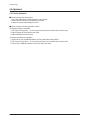
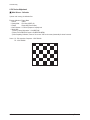
4-2-2 How to Access Service Mode
1. General Remote
To Enter: POWER OFF → INFO → MENU → MUTE → POWER ON
(Interval between key strokes: less than 3 sec)
To Exit:
POWER OFF → POWER ON
2. Factory Remote
To Enter: POWER ON → INFO → FACTORY
→ Key
To Exit:
(Interval between key strokes: less than 3 sec)
POWER OFF → POWER ON
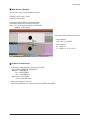
Press the Factory key twice with a key stroke interval of more than 1 second (Pressing once enters Aging Mode)
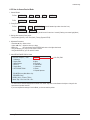
3. Settings when entering Factory mode
- Sharp Screen (Dynamic), Color Tone (Cool1), Factory (Dynamic CE Off)
4. Adjustment Procedures
- Channel ▲ ▼ Key : Select an item.
- Volume ◀▶ Key : Adjust the value up or down.
- MENU Key
: Save the changes to the EEPROM and return to the higher-level mode.
- Using the Numeric (0~9) keys, you can select a channel.
- Using the SOURCE key, you can switch AV modes.
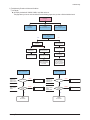
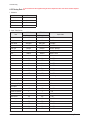
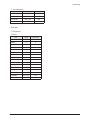
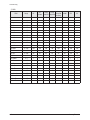
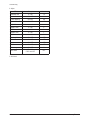
5. Initial SERVICE MODE DISPLAY State
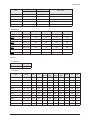
Panel ON Time(Hour) 0002
1. Calibration
2. Option Table
3. White Balance
4. SVP-UX
5. Option Block
6. SGTV5810/NTP3000
C4A_RMA
7. YC Delay
8. Adjust
9. I2C Check
10. W/B MOVIE
11. Checksum
12. Reset
13. Spread Specturm
50": C5A_RMA
T-CALMPEUH-xxxx (Main Micom Ver)
T-BDPMPEUS-xxxx
BORD2_CALLA_TR-xxxx (TR Ver)
Month / Day / Year / Hour / Min. / Sec.
※ The version of the firmware displayed at the bottom of the screen may differ and the firmware is subject to change for the
improvement of product functions.
※ If you have adjusted the settings in Service Mode, you have to reset the product.
Samsung Electronics
4-17