1
PSP overview
™
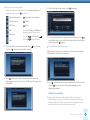
Controls for Go!Messenger™†
WLAN switch (top)
USB connector (top)
L button
R button
Enables you to attach a Go!Cam™
directional
buttons
button
Use to move around
the on-screen
keyboard
button
button
button
Memory Stick
Duo™ access
indicator
WLAN access
indicator
Lights up when
connected to a
wireless network
START button
analog stick
HOME button
SELECT button
Displays the PSP™ Home Menu
Volume buttons
Display button
Adjust the volume level during
video/audio chat
† Model shown is PSP™ Slim and Lite
Go!Messenger™ User Guide
3