1
3
Detailed guide, introduction.
FURCH is a software to display and analyse texts. If you want informations on a
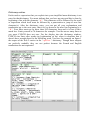
word, you will point and click the mouse on that word; The software is able to search
dictionaries for that word. If it finds something, the information will be displayed.
FURCH is a graphical application, it uses windows and more generally windgets,
which are kinds of window gadgets we are now used to see in graphic applications
and user interfaces. FURCH 2.011 is built on GTK2 and is developed on Linux.
However, the software has been ported on Win 98 SE, Win 2000 and Win XP.
The FURCH software has currently two configuration files. The first one is
“ furch.conf “.and the second one is “ gtkb.rc “. The second file is more a GTK
configuration file than a FURCH file, however. Both files must be put into the same
directory than the executable and they are used to tailor the sizes, colors and other
features of the windows and buttons. They are also used to tell the software what text
files to read and what dictionaries are available. Both files will be analyzed below.
We must also give details on the two dictionary norms in use with FURCH at present
time. Some informations on the installation of the FURCH software on Linux and on
Windows OSs have also been added.
The text files.
The FURCH software can only analyse iso-latin1 files, that is to say ordinary
uncoded text. Each file is considered to be a book which may be composed of many
pages and even, sometimes, a single page. These files may contain special tags to
indicate the separations into pages and also page headers and footers if they are
present. However, this is not necessary and if there is no tag, the software will do its
very best to display the file into readable pages and paragraphs. Still, the original file
will not be changed. You can display texts generated by a word processor such as
MS-Word or OpenOffice which contain very long lines as well as texts coming from
a more simple word editor such as Notepad or Vim. These later texts have lines of a
more reasonable length. We will see now the case of files containing tagged text.
Tagged text files.
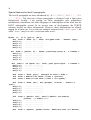
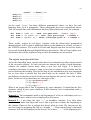
The file may contain tags which are indications to the software on how to format the
text. In its present state, the software understand only 8 tags. These tags are lines
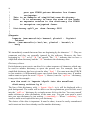
beginning by : .NPO , .NHO , .NTO , .NFO or .NP , .NH , .NT , .NF
Text files with strict format.
You may want to display on your computer pages of a book in such a way that what
you have on your screen is as close to the original as possible. Then, you must use