1
1
Connect the Control Panel
to your router
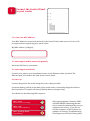
1. Locate your MAC address
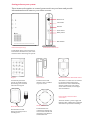
Your MAC address is located on the back of the Control Panel, make a note of it as it will
be required when registering your panel online.
My MAC address (12 digits):
2. Connecting to mobile network (optional)
Insert the SIM Card to your panel
3. Connecting to broadband
Connect your panel to your broadband router via the Ethernet cable provided. The
Ethernet port is located on the back of the Control Panel.
4. Power up
Connect the panel to the mains using the power cable provided.
Locate the battery switch on the back of the panel under a removable plug and switch to
the On position. The panel will beep (if backup battery charged only).
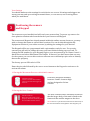
You should see the following LED sequence:
LED 1 : Green
(topmost LED on front edge)
LED 2 : Unlit
(used for alarm indications)
LED 3 : (Flashing) Amber
(unit initialising)
After approximately 2 minutes LED 3
will flash GREEN, indicating that the
unit is network operational but not yet
registered for service. If you do not
see this sequence of LED’s, please see
guidance in Testing, Troubleshooting
and Support (at the end of this guide).