1
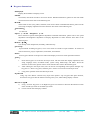
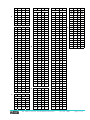
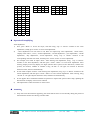
Menu Structure Flow Chart
Menu
(The first layer)
Display adjustment
Time setup
Language
Circulation mode
System setup
GSM setup
Editor
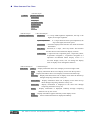
(The first layer)
Display adjustment
(The second layer)
Brightness :0~9 steps LED brightness adjustment, the step is the
higher, the stronger brightness.
Speed adjustment :0~9 steps characters flow speed adjustment, the
step is the higher, the faster speed.
TXT mode :Characters display mode selection. See under for further
information.
Stay time :ten kinds (0~9 steps ) time stay modes. This function
decides the time interval between display contents.
Color setup :1 represents red, 2 represents green, 3 represents yellow,
4 represents variegation 1, 5 represents variegation 2, 6
represents user-defined. When display screen is a
two-color display screen, user can change the display
color of display screen through this function.
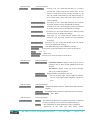
(The second layer)
(The third layer)
TXT mode
Left
:Display information flows out of display screen from right to left.
Dow :Display information flows out of display screen from the top down.
Up :Display information flows out of display screen from the bottom up.
From up :Display information flows out of display screen from the bottom up
through composing characters one by one.
From down :Display information flows out of display screen from the top
down through composing characters one by one.
From left : Display information is displayed at the same time through
composing characters one by one.
Snow : Display information is displayed randomly through composing
characters one by one at will.
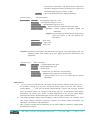
Stop :Display information appears statically on the display screen.
Random :Above-mentioned modes are displayed randomly.
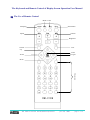
The remote control and keyboard operation
June 20, 2008
page 3 of 9