1
3.2 Hardware Specification
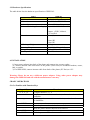
The table below lists the hardware specification of IPPH 202.
Model
IPPH 202
WAN interface
PC interface
Product Color
Universal Switching Power Supply
1 x RJ45 10 Base-T
Available for IPPH 202B
Almost Black or Grey
Input: 100-240VAC 50-60 Hz
Dimension
Output: +9VDC, 600mA,
UL certified
23cm (L)
All Package Weight
Operation Temperature
Storage Temperature
Humidity
19cm (W)
10cm (H)
1.01kg
0 – 40° C, 32° –104° F
-30° –65° C, -22°– 149° F
10 - 95%
4. INSTALLATION
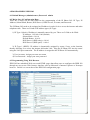
1) Insert power adapter into back of the phone and connect it to a power outlet.
2) Connect internet cable from back of the phone (WAN Port) to broadband modem, router,
hub, or switch.
3) For IPPH 202B, connect internet cable from back of the phone (PC Port) to a PC.
Warning: Please do not use a different power adapter. Using other power adapter may
damage the IPPH 202 and will void the manufacturer warranty.
5 BASIC OPERATIONS
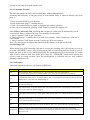
5.1 Get Familiar with Function Keys
Keypad Key
0 - 9, *(.), #
+
_
MENU
CALLED
CALLERS
MSG
HOLD
Function(s)
To input: numbers, *(.), #
Scroll to next menu/submenu selection, or lower the volume of the
loudhailer
Scroll to previous menu/submenu selection, or rise the volume of
the loudhailer
Enter menu mode
Show the phone number that has been called out
Show the phone number that has been called in
Get the voice message or other messages
Hold the present call for the moment