1
GSK928MA CNC SYSTEM OPERATION MANUAL
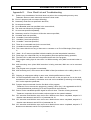
8
Auto Mode
8.1
Auto Operation
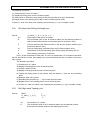
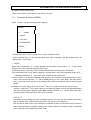
Auto mode is used for program running for part machining. When Auto mode is select from main
menu, (if alarm E92 is displayed, it indicates that there is no program stored in the part program
memory area. In this case, press any key to return to main menu. Otherwise, the following
message will be displayed:
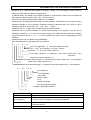
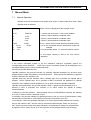
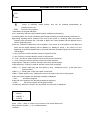
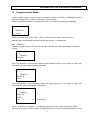
RUN P.. The number of the latest program is displayed (0-99).
_
Key in the number of the program to be executed (0-100).
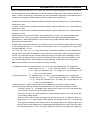
If the program with keyed in number is empty, alarm E86 will be displayed, press any key to re-key
in the program number.
If <ESC> key is pressed during input, system will return to main menu.
If < Enter > key is pressed without keying in any number, the current program displayed will be
executed.
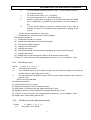
If number 100 is input, system will enter DNC mode. (Machining model: connecting with PC by
RS232 serial port, with machining while as transmitting)
Prompt: "DNC INPUT._ " and wait for PC to transmit program. When finishing transmitting or 1KB
program being transmitted, Auto mode is entered (press <Run> key to start running).During waiting
of program transmitting, D key can be pressed to exit DNC mode and return to the main menu.
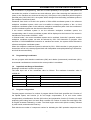
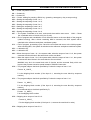
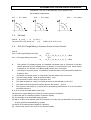
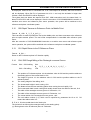
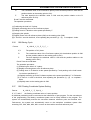
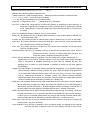
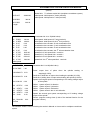
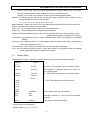
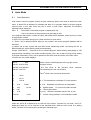
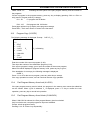
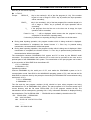
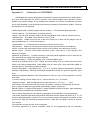
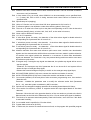
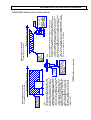
In Auto mode, the screen displays:
AUTO
E62
N30 G1 X3 W-5 F300
N40 G2 U-30 W8 R50
N50 G1 U-20 Z30
Alarm number will be displayed at the top right corner
Program content
The first block is the previous
The middle block is the current block
block
executed
The 3rd block is the next block unexecuted.
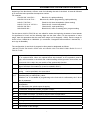
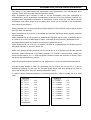
X
Y
30.65
20.33
Z
100.36
X, Y, Z is the absolute coordinate of Current position
U
0.00
S1600
V
0.00
D0 H0
W
0.00
C
0.00
F300.00
%100
U, V,W:
Remainder of positioning or interpolation
S: Spindle speed
D: Current tool radius number
H: Tool length number
C( or A): Absolute coordinate value of the 4th axis
F: Current cutting feedrate: %100 feedrate override
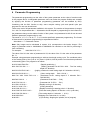
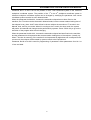
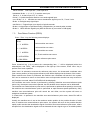
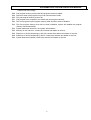
When the “AUTO B” is displayed on the left top of the screen, it means Dry run mode; “AUTO C”
displayed means Dry run is executed to the specified block. While the Auto mode is in waiting
status, functions can be achieved by pressing the following keys:
49