1
Overview
DataWedge provides a convenient mechanism for non-hardware-aware applications
to receive data from barcodes, RFID tags, Magnetic stripe cards and serial devices.
The following characteristics of DataWedge can be setup in the Registry:
•
•
•
•
Scanner to use (if more than one available)
Type of reads to use (Foreground,
Background, or Monitor)
Decoders to enable (Start from All or None
then enable or disable individual decoders)
Format in which to send data (Prefix, Suffix,
Text/Binary, Auto Enter after, Auto Tab after).
DataWedge can be manually launched or
automatically launched on system startup.
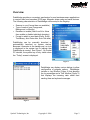
Because it executes in the background, an icon
is displayed in the system tray to indicate that
DataWedge is running. See Figure 1. On Pocket
PC devices, the system tray is only visible when
the “Today” screen is displayed.
Figure 1
DataWedge can display various dialogs to allow
configuration of program options. DataWedge
includes a Log Window (Figure 2) that displays
the log messages and a Test Window (Figure 3)
that displays the incoming data rather than
sending them as keyboard messages.
Figure 2
Symbol Technologies, Inc
Copyright © 2006
Page 2