1
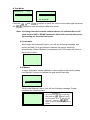
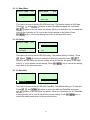
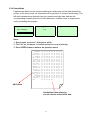
When enter [Pre-Printed] option, you will see following message. Please
complete the following steps steps:
Paper Len.
00812 dot
Gap Size
0024 dot
Gap Mode
Pre-Printed
1. Press the
button to move
the cursor from left digit to right digit,
and press the
button to set
the value from “0” to “9” and the “dot/
mm/ inch”. Press the
button to set the paper length into the
printer.
2. Press the
button to move
the cursor from left digit to right digit,
and press the
button to set
the value from “0” to “9” and the “dot/
mm/ inch”. Press the
button to set the gap size into the
printer.
3. Then, printer will feed labels to
calibrate the sensor sensitivity
automatically. When calibration is
completed, the LCD screen will return
to the previous menu.
39