1
Defining the PIP-4, 4 input Picture-in-Picture Inserter
#
Feature
Function
13
ENTER Button
14
15
ESC Button
DISTORT Button
16
17
FULL Button
MOUSE USB Connector
When in the OSD menu, press to select the current option or to confirm an
action
Exits the OSD Menu
Distorts the active pane by changing the aspect ratio. Press to enter the
DISTORT mode followed by one of the arrow buttons
Expands the active pane to full screen
Connect USB/PS/2 mouse for operating the OSD menu
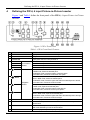
Figure 2 and Table 2 define the rear panel of the PIP-4, 4 input Picture-in-Picture
Inserter.
Figure 2: PIP-4 Rear Panel
Table 2: PIP-4 Rear Panel Features
#
18
19
20
21
22
23
24
Feature
IN 1
IN 2
IN 3
IN 4
Composite Video BNC Input
Connectors
Y/C 4-pin s-Video Output Connector
CV BNC Output Connector
RESET Button
OUTPUT
ETHERNET RJ-45 Connector
RS-232 9-pin D-sub Connector
5V DC Power Connector
Function
Connect to composite video source 1
Connect to composite video source 2
Connect to composite video source 3
Connect to composite video source 4
Connect to the s-Video acceptor
Connect to the composite video acceptor
Press and hold while switching the unit on to reset all
parameters to factory default values (see Section 8)
Connect to LAN for remote operation using a PC
Connect to a PC or other device for remote operation
Connect to supplied power adapter, center pin positive
5