1
Programming
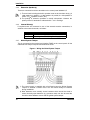
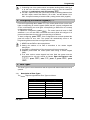
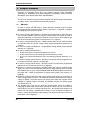
1) Single Button Setting (Option 3) allows the system to be set using the
/ or 0 keys without the need to first enter a User code.
2) EN50131-1 Requirements (Option 5) invokes the following features (see
section 4.8.1, page 40):
a) Reset (after an alarm) requires the use of a User code.
b) An entry alarm (defined as an entry timeout or, a Guard zone activation
during the entry period) invokes a 30 second delay during which the
communicator output and external sounder are suppressed (i.e. the
alarm response is limited to the internal sounder(s) and external strobe
for the first 30 seconds).
c) On unsetting the system the unset light will extinguish after 30 seconds.
d) On unsetting the system omitted zones will be re-included.
3) If Option 6 is selected the control panel will only accept Engineer codes for
the first 30 seconds after the system is unset (i.e. while the Unset light is on
if Option 5 is also selected).
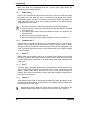
4) Option 7 allows setting to be aborted by pressing the - button. It is
particularly useful if Single Button Setting (Option 3) is selected but may be
used independently.
5) Silent Part Set Confirmation Tone (Option 4) will only function if Silent Part
Set (section 3.2.2, page 21) is also selected.
6) Option 8 must be selected if older version remote keypads are used.
3.2.2
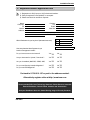
Miscellaneous Selections One !"
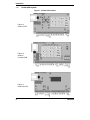
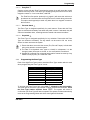
From the Programming Menu, enter !". The zone lights of the options currently
selected will illuminate. Press the appropriate numbered button(s) to select or deselect the corresponding option(s) as shown on the display. Press ,. The
system will chime to confirm that the new options have been accepted. The system will
then automatically revert to the Programming Menu and all the zone lights will illuminate.
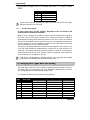
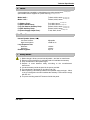
Option
1
2
3
4
5
6
7
8
Miscellaneous Selections One
Internal Sounders Only on Unset Tamper Alarm
Internal Sounders Only on Part Set Zone Alarm
Internal Sounders Only on Part Set Tamper Alarm
Silent Part Set (no exit tone on part set)
High Level Chime (chime at full volume)
Invert Bell Output (negative removed instead of negative applied, useful for SCBs)
Final Door Set (system sets 3 seconds after final door closure)
Unlock Engineer Code (re-loading factory settings restores default Engineer code)
Factory Setting
On
On
On
Off
Off
Off
Off
On
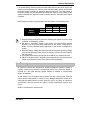
1) If Option 8 is selected (Zone 8 light is on) then Re-loading the Factory
Settings WILL restore the default Engineer code. If Option 8 is de-selected
(Zone 8 light is off) then Re-loading the Factory Settings WILL NOT restore
the default Engineer code.
2) Locked Engineer codes cannot be unlocked without the correct Boss
Engineer code.
3) Unlocking a locked Engineer code that has been lost is subject to a
minimum charge.
INS 034-9
21