1
Main Menu (continued)
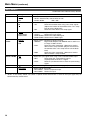
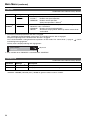
IP mode
“MODE1” performs IP conversion using inter-frame interpolation.
Conventional inter-frame interpolation involved 1-frame or greater delay, but this monitor suppresses the delay to
within 1 field.
The factory default is “MODE1”.
“MODE2” performs IP conversion using inter-field interpolation.
Since interpolation is performed inside each field, this mode is suitable for checking interlace status.
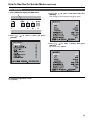
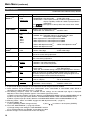
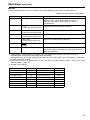
■ WB adjustment mode
Select “VAR1” to “VAR3” for “COLOR TEMP.” in the “VIDEO CONFIG” menu to make “WHITE BALANCE VAR1”
to “WHITE BALANCE VAR3” (WB) adjustments.
Underlined values indicate factory defaults.
Sub menu
Settings
Description
COLOR TEMP.*1
USER0 - 6
D93
D65
D56
Selects the color temperature that will become the basis
for adjustment.
<USER 0 - 63> Adjustable settings 0 - 63 (equivalent to a
color temperature range of 3,000 - 9,300K)
<D93>
Equivalent to a color temperature of 9,300K
<D65>
Equivalent to a color temperature of 6,500K
<D56>
Equivalent to a color temperature of 5,600K
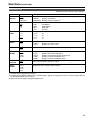
GAIN RED
0 - 1023
(Factory defaults are color
temperature <D65>
values.)
* These are the
adjustments made before
shipment from the factory.
Adjusts the GAIN elements for RED.*2
GAIN GREEN
GAIN BLUE
BIAS RED
BIAS GREEN
-512 - 511
(Factory default: 0)
Adjusts the GAIN elements for GREEN.*2
Adjusts the GAIN elements for BLUE.*2
Adjusts the BIAS elements for RED.*2
Adjusts the BIAS elements for GREEN.*2
BIAS BLUE
Adjusts the BIAS elements for BLUE.*2
RESET
Resets “GAIN RED” - “BIAS BLUE” to color temperature
values selected under “COLOR TEMP.”
*1 Selecting “COLOR TEMP.” and pressing [ENTER] after making a change, opens a confirmation screen.
Selecting “YES” and pressing [ENTER] in this screen resets selected GAIN and BIAS values to the selected
color temperature values.
*2 The item display moves to the lower part of the screen during adjustment.
21