1
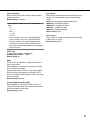
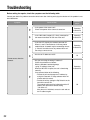
Depending on the OS installed on the PC, the following may occur.
Follow the instructions below when the following occurred. By performing the following solutions, other applications
and the security level may not be affected.
The "Information Bar" expressed in the following symptom and solutions will be displayed just below the address bar
only when there is information to communicate.
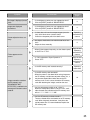
Symptom
Solutions
The following message is
displayed on the information
bar.
"Pop-up blocked. To see this
pop-up or additional options,
click here…"
• Click the information bar and select "Always Allow
Pop-ups from This Site…". The dialog window saying
"Allow pop-ups from this site?" will be displayed. Click
the [Yes] button.
The following message is
displayed on the information
bar. "This site might require
the following Active X control:
'nwcv3setup.exe' from
'Matsushita Electric Industrial
Co., Ltd'. Click here to
install..."
• Click the information bar and select "Install Active X
Control".
The "Security Warning" window will be displayed.
Click the "Install" button on the displayed "Security
Warning" window.
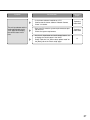
An unnecessary status bar or
scroll bar is displayed on the
pop-up window.
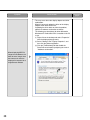
• Click "Internet Options" on the Tools menu of Internet
Explorer, and then click the [Security] tab. Then, click
the [Custom Level…] button to open the "Security
Setting" window. Under "Miscellaneous", select
"Enable" for "Allow script-initiated windows without
size or position constraints". Click the [OK] button.
The "Warning" window will be displayed. Click the
[Yes] button.
Reference
pages
–
–
–
69