1
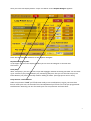
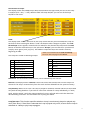
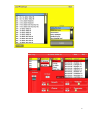
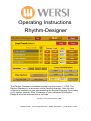
After you touch the display button "Loops" the Menu screen Rhythm‐Designer appears:
Here are the individual functions of the Rhythm‐Designer.
Rhythm‐Designer On/Off:
In the upper section of the display window you can turn the Designer on and off with
this button.
Start/Stop:
With "Start/Stop" you can start the Loops and Arpeggios without activating the OAA. You can mark
up to 4 tracks to play simultaneously. An interesting feature is that you can link the Loops to an
Effect Button (1-4) that is normally used for adding an effect. (See appropriate section later)
Loop‐Presets –Load and Save
Under Loop‐Presets "Load" you’ll find some ready-to-use combinations, to give you some idea
how to make your own. At the end of this Tutorial/Manual you’ll find a list of all pre-programmed
combinations. Naturally you can also make your own Loop-Presets and save them.
3