1
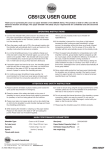
How to close KeyKeep2TM
Step 1
Step 2
Close the inner cover that
houses the buttons.
With the inner cover
upright and nearly in the
closed position (it won't
close yet).
Press the button marked at
the bottom of the keypad
And then your CODE
Step 3
Step 4
Press and hold down
the button marked with
the down arrow, this
releases the catch and
will enable you to click
the cover into the closed
position.
Close the outer weather
protective cover.
How to open KeyKeep2TM with your combination
Step 1
Step 2
Press the button at the
bottom of they keypad
and then your CODE.
Press the button marked
with the down arrow, this
is the release button.
Step 3
You can now open the
cover.
Henry Squire and Sons Ltd
Hilton Cross Business Park, Cannock Road, Featherstone, Wolverhampton, WV10 7QZ
Tel: 01902 308050 Fax: 01902 308051 Email: info@henry-squire.co.uk
www.squirelocks.co.uk
10
year
guarantee