1
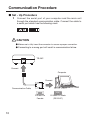
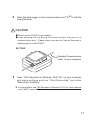
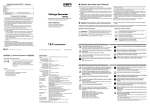
2 Place the data logger on the communication port TR-50C with the
face side down.
CAUTION
● Do not use the TR-50C in wet condition.
● Light entering the unit during the communication may result in a
communication error. Please make sure that the Thermo Recorder is
placed properly on the TR-50C.
EX: TR-52
Standard Communication
Cable (to your computer)
3 Open "T&D Recorder for Windows TR-5,7xU" on your computer
and make settings such as "Star t Recording" and other
"Recording Conditions".
▼
For more details, see T&D Recorder for Windows TR-5,7xU User's Manual
or the "HELP" menu of the software.
11