1
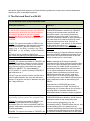
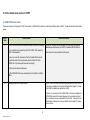
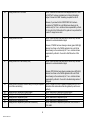
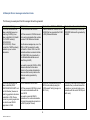
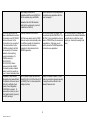
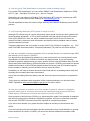
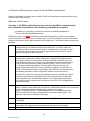
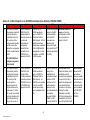
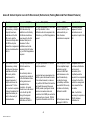
the application submitted to
HMI. Please review and
correct where needed the item
on the Customs Declaration
and/or the consignment
commodity and variety/type
submitted to PEACH
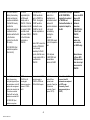
A Customs Declaration has
been submitted with DUCR
3GB123456789012-IMP1 and
no Part Number which
contains Commodity code
0805102011 Oranges.
However, for this Commodity
code, a net weight of 500 KGs
has been entered on the
PEACH application submitted
to HMI but a net weight of 400
KGs has been entered on the
matching customs declaration.
Please review and correct
where needed the net weight
for the item on the Customs
Declaration and/or the
consignment box and net
weights submitted to PEACH
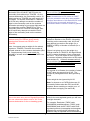
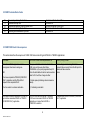
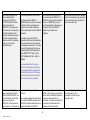
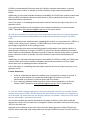
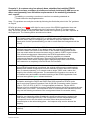
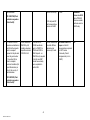
application did not contain any items
that relate to the Commodity Code
entered on the customs declaration.
downloaded for assessment, or
rejected, by an Inspector then you may
be able to amend the existing
application with the correct data.
If the item is jointly regulated
then this message will appear twice on
the E0 - once for HMI and once for
PHSI.
Check the correct commodity code has
been entered on the customs
declaration and that it equates to the
Commodity/Variety description entered
onto PEACH. Look at the CHIEF
TARIC-PEACH mappings spreadsheet
available from PEACH Home page or
FERA website.
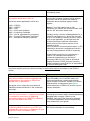
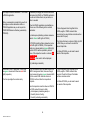
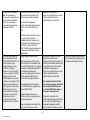
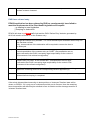
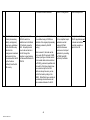
A weight mismatch has occurred.
ALVS has received and been able to
match a DUCR and a commodity code
from a PEACH application to a customs
declaration containing the same DUCR
and matching commodity code.
However, the weight entered on to the
PEACH application differs to that
entered on the customs declaration.
[This message will occur more than
once if the item is jointly regulated e.g.
between HMI & PHSI.]
Review the weight (net mass) on
PEACH and on the customs entry and
amend as appropriate.
If there are multiple commodities of the
same type, check they sum to the
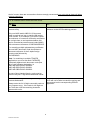
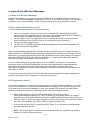
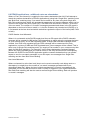
You will have to cancel the PEACH
Application and create a new
application. Alternatively if you have not
printed off the conformity certificate and
if the application has not been either
downloaded for assessment, or
rejected, by an Inspector then you may
be able to amend the existing
application with the correct data.
Note: A weight mismatch will also
occur when one customs declaration
covers multiple PEACH lines and
one of those PEACH lines maps to
an incorrect commodity code
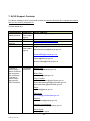
If the weight is incorrect on the
TRACES application then providing the
status is ‘New’ on TRACES then you
can amend the application with the
correct net weight. Otherwise you will
21
ALVS User Guide v1.1
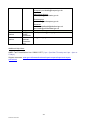
If an incorrect weight has been entered
on the customs entry amend the item to
reflect the correct weight (net mass).