1
OPERATING YOUR THERMOSTAT (CONTINUED)
MAINTAINING YOUR THERMOSTAT
YOUR INDIVIDUAL TEMPERATURE PROGRAM
TROUBLE - SHOOTING GUIDE
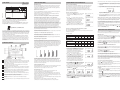
You can use the tables below to record your weekly temperature profile. Please
note that period 1 must always be programmed.
Chronotherm Modulation is able to provide you with fault diagnostic information.
Please note that the type of data sent from the boiler determines the way the
boiler faults are displayed. Review the boiler user manual for more information.
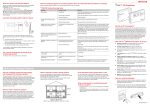
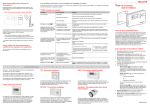
I’m planning to go out for the weekend. I would like to save energy when I
am away but I would like to be sure that my house would be at comfortable
temperature on Sunday at 17:00.
Chronotherm Modulation is made from high quality plastics and does not require
special maintenance if used under normal operational conditions.
1. Follow the same procedure as described above to select number of days you
will be away.
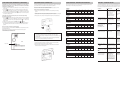
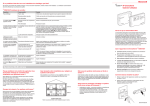
In case you have to remove your thermostat temporarily for purpose of wall
decoration or alterations follow the guidelines below.
2. Press the
(HOLIDAY) button a second time to display the holiday return
time. (The time displayed is current time + 1 hour rounded off to 30 minutes)
The return time can be adjusted using the + or – button in 30 minutes steps.
Remove the thermostat from the wall plate
Program
1. Switch off the electrical supply of the thermostat by isolating the heating
system.
3. At the programmed return time the thermostat will return to the normal control
as set by the slider position.
I’m having some friends round for party. How can I extend my heating
program for a few hours?
2. Remove the thermostat by pressing the plastic lid with a screwdriver and gently
pushing it up. This will loosen the thermostat from its wall plate
3. Always protect the contacts in the wall plate from paint or other substances
or
1
2
3
4
5
6
Time
_ _:_ _
_ _:_ _
_ _:_ _
_ _:_ _
_ _:_ _
_ _:_ _
Temperature
_ _°C
_ _°C
_ _°C
_ _°C
_ _°C
_ _°C
Symptom
Possible Cause
Remedy
Blank display
No power from the boiler
Switch the boiler on
Mains power loss lasting
more then 8 hours
Restore power supply
Wired connection
between the boiler and
the thermostat broken
Call installer to check the
wiring
The energy meter and
radiator symbol are on,
but radiators are still cold
Boiler not operating
Refer to the boiler User
Manual
Inertia of the heating
system
Allow more time for the
system to heat up
Adaptive Intelligent
Recovery action
This is normal behavior
of your thermostat after
installation. It takes a few
days before AIR function
will adjust itself to your
house
TUESDAY
Program
(HOLIDAY) button twice to display the time when you would like to
1. Press the
switch the heating off. (The time displayed is current time + 1 hour rounded off
to 30 minutes) The return time can be adjusted using the + or – button in 30
minutes steps.
2. Adjust your room temperature using TEMPerature
MONDAY
1
2
3
4
5
6
Time
_ _:_ _
_ _:_ _
_ _:_ _
_ _:_ _
_ _:_ _
_ _:_ _
Temperature
_ _°C
_ _°C
_ _°C
_ _°C
_ _°C
_ _°C
1
2
3
4
5
6
Time
_ _:_ _
_ _:_ _
_ _:_ _
_ _:_ _
_ _:_ _
_ _:_ _
Temperature
_ _°C
_ _°C
_ _°C
_ _°C
_ _°C
_ _°C
At the programmed time
the temperature is too
high or too low
comparing with
programmed values
1
2
3
4
5
6
Change of temperature
level at the wrong time
Adaptive Intelligent
Recovery action
Time
_ _:_ _
_ _:_ _
_ _:_ _
_ _:_ _
_ _:_ _
_ _:_ _
Temperature
_ _°C
_ _°C
_ _°C
_ _°C
_ _°C
_ _°C
When the temperature
level changes upward the
thermostat will
automatically adjust the
temperature level to
reach the new required
level on time
1
2
3
4
5
6
Temperature too high or
too low
Temperature level set
incorrectly
Time
_ _:_ _
_ _:_ _
_ _:_ _
_ _:_ _
_ _:_ _
_ _:_ _
Temperature
_ _°C
_ _°C
_ _°C
_ _°C
_ _°C
_ _°C
Press the I button to
check the programmed
temperature level.
Re-program the unit if
necessary.
Display shows day, time
and
symbol
Thermostat is powered
but receives no
information from the boiler
Call installer
Display shows only
symbol and spanner
every 5 sec.
There is a short or open
circuit between the boiler
and thermostat.
Call installer to check the
wiring
Currently displayed
segments and spanner
symbol are flashing
Boiler is in lockout
condition (NOTE:
Pressing the I you can
read the fault code
transmitted by the boiler.
The fault code depends
on the boiler type – refer
to the boiler User Manual
for more information)
Press the reset button to
restart the boiler. If the
symptom appears again
call installer immediately.
button
3. The thermostat will maintain the set temperature level until specified time. At
the programmed time it will return to the normal control as set by the slider
position.
WEDNESDAY
Program
How can I restore the factory program setting?
The factory program is restored when the RESET key located at the back of the
thermostat is pressed.
NOTE: Before removing the thermostat from the wall review the section
“MAINTAINING YOUR THERMOSTAT”
THURSDAY
Program
IMPORTANT!
- The wall plate terminals must not be connected to any other voltage
sources. Applying voltage to wall plate terminals can seriously damage your
heating boiler.
- Protect the electronic components from contact with any paint chemicals,
dust etc, that could cause damage to the thermostat
Mounting the thermostat on the wall plate
FRIDAY
Program
1. Check the wall plate and make sure that the contacts are clean and dry.
Reset key
2. Hang the thermostat in the holes on top of the plate
3. Move the thermostat downwards and push it gently towards the wall until
thermostat locks into the wall plate
SATURDAY
Program
1
2
3
4
5
6
Time
_ _:_ _
_ _:_ _
_ _:_ _
_ _:_ _
_ _:_ _
_ _:_ _
Temperature
_ _°C
_ _°C
_ _°C
_ _°C
_ _°C
_ _°C
1
2
3
4
5
6
Time
_ _:_ _
_ _:_ _
_ _:_ _
_ _:_ _
_ _:_ _
_ _:_ _
Temperature
_ _°C
_ _°C
_ _°C
_ _°C
_ _°C
_ _°C
SUNDAY
Program