1
COMMUNICATION
BROWSER
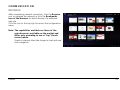
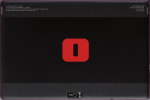
After completing network connection, click the Browser
icon to navigate the network or click the Bookmarks
icon of the browser for direct display of a preferred
web site.
Click the icon to the top right to access the configuration
menu.
Note: The capabilities available are those of the
main browsers available on the market and
differ only according to use in ‘‘tap’’ (touch
screen) mode.
Graphic-intensive sites take longer to load and may
slow navigation.
OLIPAD
19