1
This command launches Java and tells it to run VirtualVellum from the vv.jar file,
where <imagepath> is supplied to Virtual Vellum as an initialisation parameter. You
should therefore replace <imagepath> with a valid path that points to the root XML file
for the collection of images you wish to display. This can be either a local folder or
URL. For example, if you wished to display the collection of images that are specified
by a file called “images.xml” that resides in a local folder named “C:\My Pictures”,
the following command would be used to launch Virtual Vellum:
java –classpath vv.jar VirtualVellum “C:\My Pictures\images.xml”
Alternatively, files stored on a web server those root image collection filename is given
by the URL “http://www.vvpics.com/images.xml”, the following command
would be used to launch Virtual Vellum:
java –classpath vv.jar VirtualVellum http://www.vvpics.com/images.xml
Note: You only need to encapsulate the imagepath parameter with speech marks if there
is a space in its value. This is required in the first example above because of the space
between “My” and “Pictures”, however there are no spaces in the URL of the second
example and therefore speech marks are unnecessary.
3
The Interface
The three primary regions within the Virtual Vellum interface consist of a thumbnail
preview area for the collection of images, toolbar and image-viewing region.
3.1
Thumbnail Preview Area
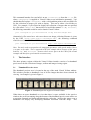
The thumbnail preview area is located at the top of the main Virtual Vellum window.
This window provides a thumbnail view of all the images that have been selected for
viewing. An example is given in Figure 1.
Figure 1: Thumbnail preview region of Virtual Vellum
When there are more thumbnails to view than there is space available in the preview
window, the scroll bar running along the bottom of the thumbnail preview area can be use
to navigate forwards and backwards through the collection. Moving the mouse over a
thumbnail will display any identifying metadata associated with the image. This