1
Saving an Application
Applications can be saved at any point in the application process by clicking ‘Save’
on the top right of the screen. You may find it helpful to save your application form
regularly, especially where you have entered large amounts of text and/or close to
completion.
Uploading Documents
Some sections of the application form allow you to upload documents containing
text/figures/images. Attached documents can be removed at any time prior to the
completion of the application.
Before uploading documents:
•
•
•
•
Please adhere to word limits, where specified
Uploaded document must NOT be password protected
Uploaded documents must be in portrait format
Please use Arial font size 11 in all uploaded documents
Please note the documents uploaded in the Additional Information section of the
application form will not be included in the generated PDF. However, they will be
included and submitted as part of the final application submission to the Wellcome
Trust.
Notes
Notes can be added to application forms without being included in the contents of the
application itself. All individuals involved in the application process can use notes to
communicate with each other. To add a note:
•
Once in the form, click ‘Notes’ in the top right corner
•
Type your note in the pop-up
•
Click ‘Add Note’
•
The name of the person, date and time of the note are added automatically
below the note text
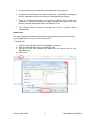
Once a note has been created for your application form, it can now be accessed from
the ‘Application Details’ page by selecting
next to the Note(s) title. Notes
cannot be deleted.
eGrants User Guide
18
Last updated: 20/05/2014