1
Introduction
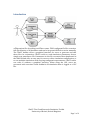
Fig 1. CReST architecture diagram. As input, CReST requires an XML
configuration file describing each data centre. XML configuration files contain a
full specification of all hardware and can be large and difficult to write manually.
The CReST builder offers a graphical interface for users to generate and edit
these files. In conjunction, CReST is able to read simulation parameters from a
simple text parameters file. Parameters in this file overwrite those duplicated in
the XML file and offer an easy way for users to edit a simulation configuration, or
to run multiple simulations with varying configuration parameters. CReST can be
run with or without a graphical interface. When using the GUI, users are
presented with run-time visual feedback. All simulation data is logged to a CSV
file.
CReST: The Cloud Research Simulation Toolkit
University of Bristol, United Kingdom
Page 2 of 9