1
Contents
Dolphin EasyReader User Guide .................................................................................. 1
Contents............................................................................................................................. 2
Chapter 1 ........................................................................................................................... 4
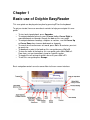
Basic use of Dolphin EasyReader................................................................................. 4
Chapter 2 ........................................................................................................................... 5
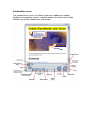
Overview of the interfaces .............................................................................................. 5
2.1 Dolphin EasyReader on-screen controls - Standard main screen ................ 7
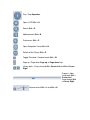
2.2 Dolphin EasyReader on-screen controls - Compact main screen................. 9
2.3 The Pop up menu ................................................................................................ 10
Chapter 3 ......................................................................................................................... 12
Opening a book .............................................................................................................. 12
3.1 About DAISY and ANSI NISO digital talking books ...................................... 13
3.1.1 Types of DAISY DTB that Dolphin EasyReader can play .................... 13
3.1.2 Types of ANSI/NISO Z39.86 DTB that Dolphin EasyReader can play
................................................................................................................................... 14
3.2 About text files .................................................................................................... 15
3.3 About HTML files ................................................................................................ 15
3.4 About DAISY XML files...................................................................................... 15
Chapter 4 ......................................................................................................................... 16
Navigating a DTB ........................................................................................................... 16
Chapter 5 ......................................................................................................................... 18
The Navigation Center .................................................................................................. 18
5.1 Library navigation center .................................................................................... 19
5.2 Index navigation center ...................................................................................... 20
5.3 Bookmark navigation center .............................................................................. 21
Chapter 6 ......................................................................................................................... 23
Adding bookmarks ......................................................................................................... 23
6.1 Free form notes.................................................................................................... 24
6.2 Navigating bookmarks ........................................................................................ 24
Chapter 7 ......................................................................................................................... 26
Find................................................................................................................................... 26
Chapter 8 ......................................................................................................................... 27
Search.............................................................................................................................. 27
Chapter 9 ......................................................................................................................... 28
Preferences ..................................................................................................................... 28
9.1 General Preferences ........................................................................................... 28
9.2 Highlighting Preferences .................................................................................... 30
9.3 Playback Preferences ......................................................................................... 33
9.4 Display Preferences ............................................................................................ 35
Chapter 10....................................................................................................................... 37
Volume control................................................................................................................ 37
Chapter 11....................................................................................................................... 38
Mini Player....................................................................................................................... 38