1
Kirk Z-3040 1407 3600 OEM
13/06/01
16:04
Side 2
Congratulations on your new DECT handset
The handset will provide you with the greatest possible degree of flexibility and mobility due to high battery
capacity, practical weight, size and design.
Contents:
8.5 Menu subscription and login .........................................21
8.5.1 Create subscription ..........................................22
8.5.2 Login.................................................................23
8.5.3 Auto login .........................................................24
8.5.4 Remove subscription........................................25
8.6 Battery ...........................................................................26
8.7 Redial ............................................................................27
8.8 Book ..............................................................................29
8.9 External services...........................................................31
8.10 MSF Functions ............................................................32
8.11 Mail/Text messages.....................................................33
9. Shortcuts .............................................................................35
10. Information ..........................................................................36
10.1 Error tree .....................................................................36
10.2 Error information .........................................................37
10.3 Warranty......................................................................37
10.4 Technical information ..................................................38
1.
2.
3.
4.
5.
6.
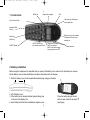
Construction ...........................................................................4
Battery installation ..................................................................5
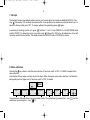
Charging .................................................................................6
Key functions ..........................................................................7
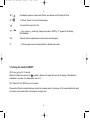
Turning the handset ON/OFF .................................................9
Making a call.........................................................................10
6.1 Receiving calls................................................................12
6.2 During conversation .......................................................13
6.2.1 Volume regulation .................................................13
6.2.2 Microphone mute ..................................................13
6.2.3 Transferring the call to another handset...............13
7. Set ups .................................................................................14
8. Menu structure .....................................................................15
8.1 Using the alphanumeric keyboard .................................16
8.2 Key functions..................................................................17
8.3 Profile set up ..................................................................18
8.4 Profile functions..............................................................20
3