1
Plug-in Installation
Prerequisites
Eclipse
Before installing the EPIC plug-in, Eclipse version 3.1 or higher has to be installed.
Eclipse comes in two flavors. The SDK version contains Java IDE components and is much larger
than the Platform version. If you only want to use Eclipse as a Perl IDE, the Platform version is sufficient. If you are in for Perl and Java coding, use the SDK version.
Eclipse does not include a Java Runtime Environment (JRE). You will need a 1.4.1 level or higher
Java Runtime or Java Development Kit (JDK) installed on your machine in order to run Eclipse.
Eclipse can be downloaded from www.eclipse.org [http://www.eclipse.org].
Perl
In order to have all EPIC features like Syntax Checking, Source Formatting etc., a Perl interpreter is
needed. In principle any Perl interpreter can be used. To use debugging within Eclipse, Perl version
5.8.x or 5.6.x is required. For further requirements concerning the debugger, see the section called
“Setting Up the Debugger”.
Most *nix/Linux installations will provide Perl interpreters out of the box.
Perl for Windows can be downloaded from www.activestate.com [http://www.activestate.com]
Considerations when using Cygwin
Make sure that the mount command is available and that it is in your system path. As mount is a
standard component of Cygwin, you usually just have to add the cygwin\bin directory to your system path.
Installation
The installation is done by using the Eclipse Update Manager. The Update Manager connects to an
EPIC Update Site [http://e-p-i-c.sourceforge.net/updates]. The Update Site can also be stored locally
if no Internet connection is available and can be downloaded from the EPIC project page
[http://e-p-i-c.sourceforge.net].
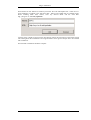
After starting Eclipse, select Help->Software and Updates->Find and Install... from the menu.
1