1
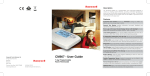
Controls Layout
Contents
1
19
2
3
4
5
6
18
GETTING STARTED WITH the CM927
7
8
DAY
17
AUTOMANOFF
15
CM927
1..6
DATE
PROG
AUTO
MAN
OFF
9
10
14
13
11
12
1
Day / Date Display
11
Program Buttons
2
Time Display
12
Battery Compartment Lid
3
LoT Technology Display
13
Battery Compartment
4
Heating On Indicator
14
Holiday Function Button
5
Battery Low Indicator
15
Party Function Button
6
Temperature Display
16
Day Off Function Button
7
Temperature Change Buttons
17
Copy Day Button
8
Temperature Enquiry Button
18
Day Select Button
9
Slider Switch
19
Time Change Buttons
10 Green OK Button
Programming the CM927
The Built-in Heating Program............................................. 5
Reviewing the Heating Program........................................ 5
Modifying the Heating Program......................................... 5
Disabling / Enabling Time Periods ................................... 7
COPY
DAY
16
STEP 1: Installing the Batteries.......................................... 3
STEP 2: Setting the Date and Time.................................... 4
STEP 3: Running the Built-In Heating Program................. 4
operating the CM927
Choosing the Operating Mode.......................................... 8
AUTO mode............................................................. 8
MAN mode............................................................... 8
OFF mode................................................................ 8
During Normal Operation.................................................. 8
Temperature Enquiry................................................ 8
Temperature Override.............................................. 9
Using the Special Functions.............................................. 9
HOLIDAY Function................................................... 9
PARTY Function...................................................... 10
DAY OFF Function.................................................. 11
Adjusting the Time........................................................... 11
fine tuning the CM927
Changing the User Parameters....................................... 12
Change the Time Format........................................ 13
Reset the Built-in Program...................................... 13
Summer / Winter Time Change.............................. 13
FAQ’s & troubleshooting
Trouble Shooting Guide................................................... 14
Frequently Asked Questions............................................ 16
WHAT IS A PROGRAMMABLE ROOM THERMOSTAT?
An explanation for householders..................................... 19
WHAT IS A PROGRAMMABLE ROOM THERMOSTAT?
...an explanation for householders
(The following explanation applies to heating applications only)
A programmable room thermostat is both a programmer and a room thermostat. A
programmer allows you to set ‘On’ and ‘Off’ time periods to suit your own lifestyle.
A room thermostat works by sensing the air temperature, switching on the heating
when the air temperature falls below the thermostat setting, and switching it off once
this set temperature has been reached.
So, a programmable room thermostat lets you choose what times you want the
heating to be on, and what temperature it should reach while it is on. It will allow you
to select different temperatures in your home at different times of the day (and days
of the week) to meet your particular needs.
Turning a programmable room thermostat to a higher setting will not make the room
heat up any faster. How quickly the room heats up depends on the design of the
heating system, for example, the size of boiler and radiators.
Neither does the setting affect how quickly the room cools down. Turning a
programmable room thermostat to a lower setting will result in the room being
controlled at a lower temperature, and saves energy.
The way to set and use your programmable room thermostat is to find the lowest
temperature settings that you are comfortable with at the different times you have
chosen, and then leave it alone to do its job. The best way to do this is to set low
temperatures first, say 18°C, and then turn them up by one degree each day until you
are comfortable with the temperatures. You won’t have to adjust the thermostat further.
Any adjustments above these settings will waste energy and cost you more money.
If your heating system is a boiler with radiators, there will usually be only one
programmable room thermostat to control the whole house. But you can have different
temperatures in individual rooms by installing thermostatic radiator valves (TRVs) on
individual radiators. If you don’t have TRVs, you should choose a temperature that
is reasonable for the whole house. If you do have TRVs, you can choose a slightly
higher setting to make sure that even the coldest room is comfortable, then prevent
any overheating in other rooms by adjusting the TRVs.
The time on the programmer must be correct. Some types have to be adjusted
in spring and autumn at the changes between Greenwich Mean Time and British
Summer Time.
You may be able to temporarily adjust the heating programme, for example, ‘Override’,
‘Advance’ or ‘Boost’. These are explained in the manufacturer’s instructions.
Programmable room thermostats need a free flow of air to sense the temperature, so
they must not be covered by curtains or blocked by furniture. Nearby electric fires,
televisions, wall or table lamps may prevent the thermostat from working properly.
Manufactured for and on behalf of the Environment and Combustion Controls Division of Honeywell Technologies Sàrl, Ecublens, Route du Bois 37,
Switzerland by its Authorised Representative Honeywell International Inc.