1
Installation
The DM-BB-IN Input Unit can either be mounted to any suitable solid surface or concealed inside a backbox.
Surface Mounting Method
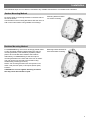
Fit the two snap-on mounting brackets on the back side of
the unit as shown.
Mounting bracket location
for surface mounting.
Use the holes in the mounting brackets to affix the unit to a
wall or other solid surface using suitable screw fixings.
Backbox Mounting Method
For unsecured fixing, the unit can be simply placed inside
a UK or European backbox (without fitting the snap-on
mounting brackets). This enables a proprietary switch
plate to be connected and screwed to the backbox.
Mounting bracket location for
secured backbox mounting.
Alternatively, for secured fixing, fit the two snap-on
mounting brackets on the front side of the unit as shown.
The unit can then be secured to the backbox using
suitable fixing screws (up to M3.5).
NOTE: The mounting bracket holes are spaced to suit
either a UK (60.3mm pitch) or European (60mm pitch)
backbox.
CAUTION: Do not over tighten the fixing screws as
this may cause the brackets to split.
3