1
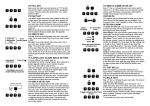
TO RESET AFTER AN ALARM
Enter
Building
X
Go To Control
Panel
X
X
X
Zone
Day
Alarm when set: When an alarm occurs
with the system either 'Fully Set' or 'Part
Set', go to control panel and key-in your
four digit access code. The panel 'Day'
light and the light(s) associated with the
alarm condition will be illuminated.
Reset system: To reset the system,
key-in your access code again. The 'Day'
light only will be illuminated.
Tamper Alarm: If you hear the internal
sounder with the system off (Day), go to
control panel. The 'Tamper' light will be
illuminated. Key-in your access code to
stop the sounder. Call your alarm
installer for service.
Panic Alarm: To cancel a 'Panic Alarm',
first reset the panic button, then key-in
your four digit access code.
TO CHANGE YOUR ACCESS CODE
Your new code can be ANY four digit
code you choose.
6
The Old Four Digit Code
ENTER
ENTER
Two Bleeps
from
Sounder
TO TEST BELLS
4
X
ENTER
X
X
X
The system must be in 'Day' before
starting the test.
The external and internal sounders will
operate for three seconds and then the
strobe will operate for three seconds.
The system will then return to 'Day'.
TO WALK TEST
5
X
ENTER
X
X
X
When you have completed the sequence
shown on the left, the internal sounder
will emit a steady tone.
You can now test the operation of the
Exit/Entry zone, Zones 1, 2 and 3. Each
time a zone is opened, the internal
sounder will emit a pulsing tone.
You cannot test the 'Tamper Circuits' or
the 'Panic Buttons' without creating an
alarm condition.
To stop walk test, key-in your access
code.