1
c. Reposition
handset
retainer
down
(up
position)
PART 68: NETWORK REGISTRATION NUMBER
d. Replace handset
retainer
This equipment is registered with the FCC in accordance with
Part 68 of the FCC Rules.
PART 68: ANSWER SUPERVISION SIGNALLING
Allowing this equipment to be operated in a manner that does not
provide proper answer-supervision signaling is in violation of Part
68 Rules. This equipment returns answer-supervision signals to
the public switched network when:
(down
position)
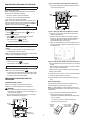
Figure 5. Reversing the Handset Hook
2 Turn the telephone upside down so that you can see the
•
Answered by the called station
•
Answered by the attendant
Routed to a recorded announcement that can be administered
by the CPE user
•
bottom of the telephone.
This equipment returns answer-supervision signals on all DID
calls forwarded back to the public switched telephone network.
Permissible exceptions are:
3 Remove the mounting base by sliding the base to the left
until it is free of the telephone. See Figure 5.
4 Turn the base so the larger end is down.
5 Plug one end of the line cord into the line jack on the
bottom of the telephone. (Keep the cord bundle in the
cavity on the lower housing.) Leave the other end of the
cord unattached for later use.
•
A call is unanswered
•
A busy tone is received
•
A reorder tone is received
CONNECTION AND USE WITH THE NATIONWIDE
TELEPHONE NETWORK
Note: You may prefer to use an 8-inch line cord rather
than the 14-foot cord provided with the telephone. If you
use the 14-foot cord, you will need to place it into the
back of the telephone in its original coiled position.
The FCC requires that you connect your telephone equipment to
the nationwide telephone network through a modular telephone
outlet or jack. The modular telephone outlet or jack to which the
telephone must be connected is a USOC RJ11C or RJ11W. The
6 After you have attached the stand to the telephone, use
the screw provided to tighten the stand onto the back of
the telephone set.
telephone may not be used on coin service provided by the
telephone company. Connection to party lines is subject to state
tariffs. (Contact your state public utility commission or corporation
commission for information.)
INFORMATION FOR THE TELEPHONE COMPANY
Upon request of your local telephone company, you are required
to provide them with the following information: A.) Your phone
number. B.) The telephone equipment’s FCC registration number
and ringer equivalence number (REN). These numbers are on
the back or bottom of your telephone equipment. The REN is
useful to determine how many devices you may connect to your
telephone line and still have them ring when your telephone line
is called. At most, but not all areas, the sum of all REN’s should
be 5 or less. You may want to contact your local telephone
company.
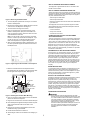
Figure 6. Tightening the Stand to Back of the Telephone
REPAIR INSTRUCTIONS
If it is determined that your telephone is malfunctioning, the FCC
requires that it not be used and that it be unplugged from the
modular outlet until the problem is corrected. Repairs can only be
made by the manufacturer or its authorized agents or by others
who may be authorized by the FCC.
7 Slide the reversed base onto the telephone into the
appropriate tabs near the bottom of the set and then slide
it to the right until it snaps into place. See Figure 6.
RIGHT OF THE TELEPHONE COMPANY
If telephone equipment is causing harm to the telephone network,
the telephone company may temporarily discontinue your
telephone service. If possible, they’ll notify you before they
interrupt service. If advance notice isn’t practical, you’ll be notified
as soon as possible. You’ll be given the opportunity to correct the
problem, and you’ll be informed of your right to file a complaint
with the FCC. Your telephone company may make changes in its
facilities, equipment, operations or procedures that could affect
the proper functioning of your Avaya product. If such changes are
planned, you’ll be notified.
Invert stand
Holes
for wall
mounting
Position stand
over 4 holes,
push stand down,
and slide to left
INTERFERENCE INFORMATION
!
Figure 6. Installing the Stand for Wall-Mounting
8 Plug one end of the coiled handset cord into the handset
jack on the side of the telephone.
9 Plug the free end of the line cord into a modular wall jack.
10 Place the telephone against the wall jack mount and push
down so that the base locks into the slots on the
telephone.
11 Plug the free end of the coiled handset cord into the
handset and hang up the handset.
12 Lift the handset and listen for dial tone.
13 Set the Ringer Volume Control switch to the settings you
want.
3
WARNING:
Some telephone equipment generates and uses radio
frequency energy and if not installed and used properly, that
is, in strict accordance with the manufacturer’s instructions,
may cause interference to radio and television reception.
This telephone has been type tested and found to comply
with the limits for a Class B computing device in
accordance with the specifications in Subpart J of Part 15 of
FCC Rules, which are designed to provide reasonable
protection against such interference in a residential
installation.