1
Contents
Contents
1
2
2.1
3
4
4.1
4.2
5
5.1
5.2
5.3
6
6.1
Introduction
Getting Started
Quick Start
Overview
Your VP-503xl/VP-504xl Scan Converter
Your VP-503xl UXGA Scan Converter
Your VP-504xl UXGA/HD Scan Converter
Connecting the VP-503xl/VP-504xl
Connecting your VP-503xl UXGA Scan Converter
Connecting your VP-504xl UXGA/HD Scan Converter
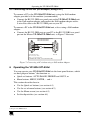
Controlling via RS-232 (for example, using a PC)
Operating the VP-503xl/VP-504xl
Using the Quick-Set Buttons
1
1
1
3
3
4
5
7
7
9
11
11
12
6.1.1
6.1.2
6.1.3
Using the AUTO IMAGE Button
Using the FREEZE Button
Using the OS/US Button
12
12
12
6.2
6.3
Adjusting the Display via the Menu Buttons
Using the Menu
13
13
6.3.1 The Advanced Menu
6.3.1.1 Test Patterns
6.3.1.2 Save and Recall
14
14
14
6.4
Setting the Dipswitches for VP-503xl and VP-504xl
15
6.4.1
6.4.2
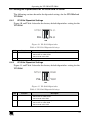
VP-503xl Dipswitch Settings
VP-504xl Dipswitch Settings
15
15
7
8
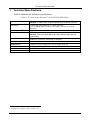
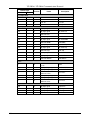
Technical Specifications
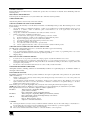
VP-503xl / VP-504xl Communication Protocol
16
17
Figures
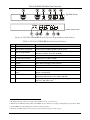
Figure 1: VP-503xl UXGA Scan Converter
Figure 2: VP-503xl UXGA Scan Converter (Top and Lower Side Panel)
Figure 3: VP-504xl UXGA/HD Scan Converter
Figure 4: VP-504xl UXGA/HD Scan Converter (Top and Lower Side Panel)
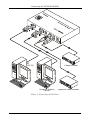
Figure 5: Connecting the VP-503xl
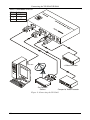
Figure 6: Connecting the VP-504xl
Figure 7: Connecting a PC without using a Null-modem Adapter
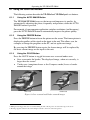
Figure 8: Over-scanned and Under-scanned images
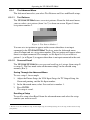
Figure 9: Test Pattern Number 1
Figure 10: VP-503xl Dipswitches
Figure 11: VP-504xl Dipswitches
4
4
5
6
8
10
11
12
14
15
15
i