1
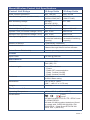
Wireless Sensor
www.monnit.com
Relay 1
PN: MNA-X-CTL
© 2014 Monnit Corp.
Relay 2
Radio
Power
CONTROL
Using the Wireless Control Unit
1. Adding a Wireless Control Unit to a Sensor Network
Monnit wireless control units can be added to any Monnit sensor
network through the iMonnit online sensor monitoring software.
The control unit is added to the network like a sensor is. Do not power
it on until it has been assigned to a network. From the iMonnit portal
enter the ID and the Code.
Steps to add a wireless control unit to your sensor network.
•
•
•
•
Choose “Manage” from the main navigation.
Select the network you would like to add the control unit to.
Find the bottom of the section “Sensor List / Assign Sensor”.
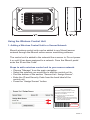
Enter the ID and Security Code from the back label of the
control unit.
• Press the “Assign Sensor” button.
Contains FCC ID: ZTL-RFSC1
and IC: 9794A-RFSC1
This device complies with Part 15 of the
FCC Rules. Operation is subject to the
following two conditions:
(1) this device may not cause harmful
interference and
(2) this device must accept any interference
received, including interference that may
cause undesired operation.
ID: ######
Code: XXXXXX
PAGE 3