1
Installation Manual
Contents
Table of Contents
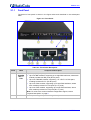
1 Introduction......................................................................................................... 7 2 Installing the Device ........................................................................................... 9 2.1 Physical Description .................................................................................................9 2.1.1 Front Panel.............................................................................................................. 10 2.1.2 Rear Panel .............................................................................................................. 11 2.2 Unpacking and Checking Package Contents .........................................................12 2.3 Mounting the Device ...............................................................................................12 2.3.1 Desktop Mounting ................................................................................................... 12 2.3.2 19-Inch Rack Mounting ........................................................................................... 14 2.4 Cabling the Device .................................................................................................15 2.4.1 Connecting to Earth (Ground) ................................................................................. 16 2.4.2 Connecting to IP Network ....................................................................................... 16 2.4.3 Connecting to E1/T1 Trunks ................................................................................... 17 2.4.4 Connecting E1/T1 Trunks for PSTN Fallback ......................................................... 18 2.4.5 Connecting to ISDN BRI Lines................................................................................ 19 2.4.6 Connecting BRI Interfaces for PSTN Fallback........................................................ 20 2.4.7 Connecting to FXS/FXO Interfaces......................................................................... 21 2.4.8 Connecting to Analog Lifeline Phone ...................................................................... 22 2.4.9 Connecting to Dry Contact Relay Alarm System .................................................... 23 2.4.10 Connecting RS-232 Serial Interface to PC ............................................................. 24 2.4.11 Connecting to the Power Supply............................................................................. 24 3 Configuring the Device .................................................................................... 25 3.1 Assigning an IP Address ........................................................................................25 3.1.1 Assigning an IP Address using HTTP ..................................................................... 26 3.1.2 Assigning an IP Address using BootP .................................................................... 27 3.1.3 Assigning an IP Address using Voice Menu Guidance........................................... 29 3.1.4 Assigning an IP Address using CLI......................................................................... 32 3.2 Configuring Basic SIP Parameters .........................................................................33 3.2.1 Enabling Channels and Configuring Call Routing (Example) ................................. 34 3.2.2 Configuring PSTN Trunks ....................................................................................... 36 3.3 Saving Configuration and Resetting the Device .....................................................38 3.4 Changing Login User Name and Password ...........................................................39 3.5 Backing Up and Restoring Configuration ...............................................................40 3.6 Restoring Factory Defaults .....................................................................................41 3.7 Upgrading the Device .............................................................................................42 3.7.1 Upgrading Firmware ............................................................................................... 42 3.7.2 Loading ini and Auxiliary Files ................................................................................ 45 4 Monitoring the Device ...................................................................................... 47 4.1 Front-Panel LEDs ...................................................................................................47 4.2 Web Interface .........................................................................................................48 4.2.1 Viewing Alarms ....................................................................................................... 48 4.2.2 Viewing Channel Status .......................................................................................... 49 Version 6.2
3
February 2011