1
Related Topics
Specifications
Installation / Wiring (refer to Imperial System Guide)
• System Diagrams and Wiring Tips
• Wire Gauge Selection
• Conventional vs. MAMA Wiring
Input voltage
Typically 12Vdc (from Multibus)
Multibus
4 wire at up to 900m (3,000ft)
Current
Consumption
80mA
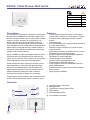
Features
• Remote Firmware Upgrade
• Bi-directional Locate Feature
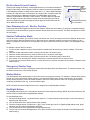
• Save Dimming Level / Shutter Position
• Shutter Calibration Mode
• Emergency Shutter Stop
• Global Button
• Backlight Button
Dimensions
7.4cm X 11cm X 2.5cm (2.9” X 4.3” X 1”)
Operating
Temperature
-10ºC to 50ºC
14ºF to 122ºF
Applications (refer to Imperial System Guide)
• Light Control
• Shutters
• Macros
BabyWare (refer to Imperial System Guide)
• BabyWare
Wiring
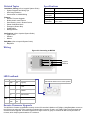
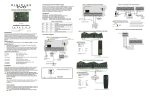
Figure 20: Connecting an MVCA2
Imperial
Multibus
LED Feedback
BUS
Red
on
Red
flash
RX
TX
STATUS
Green
flash
Green
flash
OK (communication in
progress)
-
-
Com fail: Short on GRN
or YEL
-
Green
on
Com fail: too many
modules
Green
on
Green
on
Com fail: GRN and YEL
lines reversed
-
-
Green
flash
Green
flash
Status Bar
LEDs indicate dimmer level / shutter position
Bus power too low
Module locate mode
Remote Firmware Upgrade
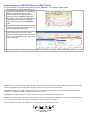
The MVCA2 is firmware upgradeable remotely via the V32 controller’s Multibus at 57.6Kbps. Using BabyWare connect to
the V32 account using any of the connection methods (direct connect, IP static, or IP DNS). Right-click the desired wall
switch and select Upgrade. A firmware upgrade for a single module or group of modules will take usually less than 10
minutes, which keeps system downtime to a minimum.