1
DLM26 Digital Speaker Processor
User Manual
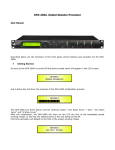
Described below are the functions of the front panel control buttons and encoders for the DLM26.
•
Getting Started
As soon as the DLM26 is turned ON the device model name will appear in the LCD screen:
DLM26
Speaker Management
and a status bar will show the progress of the DLM26 initialization process:
DLM26
The DLM26 has three factory pre-set working modes: “2x2 Ways Xover + Sub”, “2x3 Ways Xover”
and “6 Ways Xover”.
After the initialization, the DLM26 will show on the LCD the first of the embedded preset working
modes, or the last one selected prior to the unit being turned off.
First time activation will default to the first of the preset working modes.
DLM26
2x3 WAY X-OVER