1
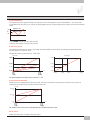
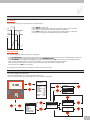
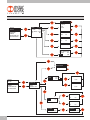
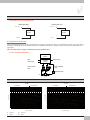
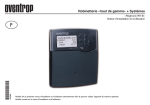
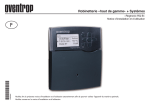
1.FEATURES • Electrical connection: M12 8-pin connector • Preset pressure range 0.05-10 bar with possible full scale regulation. • 10–100 mbar adjustable deadband • Supply pressure: FS+ at least 1 bar, max 11 bar • 24Vdc power supply • IP65 index of protection • LED indicating pressure achieved and digital output active • Graphical display and keypad to display the pressure, unit of measurement and parameter setting. • 0-10 V analog output signal 2. SETTINGS Press OK and ESC together to access the setting menu. Select the parameter using the arrow keys. Press ESC to return to the previous page. During setting, pressure regulation is NOT active. 2.1 DISPLAY 2.1.1LANGUAGE Italiano English Deutsch Español Français • Select LANGUAGE using the arrow keys, then press OK. • Select the desired language using the arrow keys, then press OK 2.1.2 UNIT OF MEAS. bar PSI MPa • Select UNIT OF MEAS. using the arrow keys, then press OK • Select the desired unit of measurement using the arrow keys, then press OK 2.1.3 CONTRAST • Manual display contrast adjustment • Select CONTRAST using the arrow keys, then press OK. • Select the value using the arrow keys, then press OK. • Compensation as a function of temperature is automatic. 2.2 SET UP 2.2.1 INPUT 0 / 10 V 0/5V 4 / 20 mA RS232 Keypad • Select INPUT using the arrow keys, then press OK. • Select the type of input using the arrow keys and then press OK. • For the type of analog input (0/10V-0/5V-4/20mA), use an appropriate analog signal. • For the type of RS232 input, use the communication protocol described in chapter 12. • For the type of keypad input, set the pressure value using the arrow keys. When you press the display buttons, the set pressure appears; when you release them, the preset pressure is displayed. 2