1
About your safety ............................................................................................................................. 3
General information................................................................................................................... 3
Protection from electric shock.................................................................................................... 3
Definition of users...................................................................................................................... 3
Certification and Warranty ................................................................................................................ 4
Certification ............................................................................................................................... 4
Warranty ................................................................................................................................... 4
Limitation of Warranty ........................................................................................................ 4
Introduction ...................................................................................................................................... 4
Chapter1 Quick Reference ............................................................................................................... 5
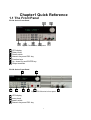
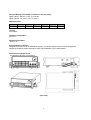
1.1 The Front Panel................................................................................................................... 5
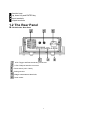
1.2 The Rear Panel ................................................................................................................... 6
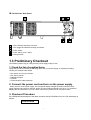
1.3 Preliminary Checkout .......................................................................................................... 7
1. Check the list of supplied items ...................................................................................... 7
2. Connect the power cord and turn on the power supply ................................................... 7
3. Checkout Procedure....................................................................................................... 7
1.4 Output Checkout ................................................................................................................. 8
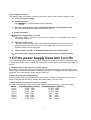
1.5 If the power Supply Does Not Turn On ................................................................................ 9
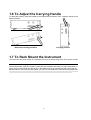
1.6 To Adjust the Carrying Handle........................................................................................... 10
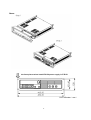
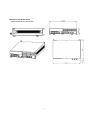
1.7 To Rack Mount the Instrument........................................................................................... 10
1.8 Optional accessory............................................................................................................ 13
Chapter 2 Specifications................................................................................................................. 14
2.1 Specifications .................................................................................................................... 14
IT6120 Series DC Power Supply ...................................................................................... 14
IT6150 Series High Resolution Power Supply .................................................................. 15
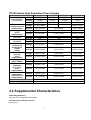
2.2 Supplemental Characteristics ............................................................................................ 15
Chapter 3 Front-panel Operation.................................................................................................... 18
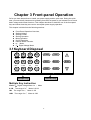
3.1Keyboard Disposal ............................................................................................................. 18
Multiple Key Instruction .................................................................................................... 18
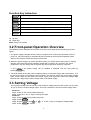
Function Key Instruction ................................................................................................... 19
3.2 Front-panel Operation Overview........................................................................................ 19
3.3 Setting Voltage .................................................................................................................. 19
3.4 Setting Current .................................................................................................................. 20
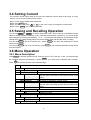
3.5 Saving and Recalling Operation ........................................................................................ 20
3.6 Menu Operation................................................................................................................. 20
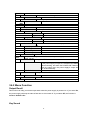
3.6.1 Menu Description..................................................................................................... 20
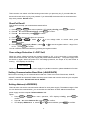
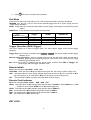
3.6.2 Menu Function......................................................................................................... 22
3.7 Output Operation............................................................................................................... 27
3.8 Remote Sense................................................................................................................... 27
3.9 Milliohm Meter ................................................................................................................... 28
3.10 Voltage Meter .................................................................................................................. 28
Chapter 4 Remote Operation Mode................................................................................................ 29
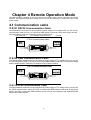
4.1 Communication cable ........................................................................................................ 29
IT-E131 RS232 Communication Cable ............................................................................. 29
IT-E132 USB Communication Cable................................................................................. 29
IT-E135 GPIB Communication Cable................................................................................ 29
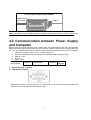
4.2 Communication between Power Supply and Computer ..................................................... 30
2