1
TABLE OF CONTENTS
1
INTRODUCTION
5
2
INSTALLATION OF PAYMENT TERMINAL AND PINPAD
6
1.1
1.2
2.1
2.2
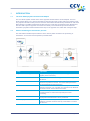
The CCV Smart payment terminal and PINpad
Parties facilitating the transaction process
5
5
Components supplied
Installation guidelines
2.2.1
Position of PINpad
2.2.2
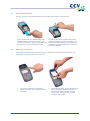
Use of card reader
2.2.3
Environmental factors
Installation of equipment
Communication settings
2.4.1
Taking out an Internet subscription
2.4.2
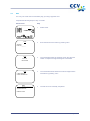
View current communication settings
2.4.3
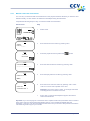
Assigning a static IP address
2.4.4
Assigning a dynamic IP address
6
7
7
7
7
8
9
9
9
10
12
WORKING WITH THE PAYMENT TERMINAL AND PINPAD
3.7
3.8
Overview of payment terminal and PINpad
Keypad of payment terminal and PINpad
PINpad touchscreen
3.3.1
Entering letters
Payment terminal menu
3.4.1
Symbols for menu options
3.4.2
Status symbols
Merchant password
Activating and deactivating the payment terminal
3.6.1
Activating the terminal
3.6.2
Deactivating the terminal
Use of payment cards
Replacing a printer roll
13
4
CARRYING OUT TRANSACTIONS
4.3
4.4
4.5
Overview of transaction types
Sale
4.2.1
Manual credit card transactions
Cancellation
Reservation
Sale after reservation
23
5
PAYMENT CARDS
30
6
FINANCIAL REPORTS
37
2.3
2.4
3
3.1
3.2
3.3
3.4
3.5
3.6
4.1
4.2
5.1
5.2
6.1
6.2
6.3
6.4
6.5
CID086A/03012013
Viewing payment card settings
Changing payment card settings
5.2.1
Adding a payment card
5.2.2
Deleting a payment card
5.2.3
Changing the Merchant ID for a payment card
Types of financial reports
Automatically printing reports when the terminal is deactivated
Printing interim reports
6.3.1
Printing an interim totals report
6.3.2
Printing an interim E-Journal
Changing report settings
6.4.1
Activating the E-Journal feature
6.4.2
Deactivating the E-Journal feature
Deleting the E-Journal
13
15
17
17
18
18
19
20
21
21
21
22
22
23
24
25
26
27
29
30
32
32
34
35
37
37
38
38
40
42
42
44
45
Page 3 of 54