1
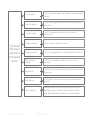
“The indicator
light shows a
colour and I do
not know what
it means.”
Green (continious)
The SPT is connected to a power source (adapter or computer) and is fully
charged.
Green (slow blinking)
The SPT is sufficiently charged for the use in the next night (at least 8
hours of use).
Green (fast blinking)
The SPT is charging and can be used for at least 8 hours after
disconnection.
Orange (slow blinking)
The SPT needs to be charged for the next use.
Orange (fast blinking)
The SPT is charging and needs to be charged further before the next use.
Red (continuous or
blinking)
The SPT needs to be reset. See troubleshoot section ‘reset’ for
instructions.
Blue (blinking)
The SPT shows the amount of vibrational feedback that was given during
the past night.
White (blinking)
The SPT shows you how many times you slept on your back during the
past night.
Purple (continuous)
Warning! Do not disconnect the device from the computer. The device is
installing new firmware. This will take about one minute. Wait until the
purple light dims before disconnecting the device from your computer.
NightBalance SPT-PX
English manual
67