1
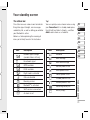
The status bar
Tip!
The status bar uses various icons to indicate
things like signal strength, new messages
and battery life, as well as telling you whether
your Bluetooth is active.
You can quickly access chosen menus using
your Favourites list. In standby mode press
the left soft key. Select <Empty>, and then
Add to add a menu as a favourite.
Below is a table explaining the meaning of
icons you’re likely to see in the status bar.
01
02
03
04
05
06
Icon
Description
Network signal strength
(number of bars will vary)
No network signal
GPRS available
EDGE available
Flight mode is activated
Calls are diverted
Roaming service
Bluetooth® is activated
WAP service is connected
An alarm is set
Icon
Description
Schedule
07
08
New message
New voice message
General profile in use
Silent profile in use
Vibrate profile in use
Outdoor profile in use
Headset profile in use
Remaining battery life
Battery empty
YOUR STANDBY SCREEN
s
Your standby screen
21