1
Marius Cautun
Contents
1 Introduction
1.1 The DTFE method . . . . . . . . . . . . . . .
1.2 The DTFE public software . . . . . . . . . . .
1.3 Program requirements and RAM consumption
1.4 Understanding the user guide . . . . . . . . .
.
.
.
.
.
.
.
.
.
.
.
.
.
.
.
.
.
.
.
.
.
.
.
.
.
.
.
.
.
.
.
.
.
.
.
.
.
.
.
.
.
.
.
.
.
.
.
.
.
.
.
.
.
.
.
.
.
.
.
.
.
.
.
.
.
.
.
.
.
.
.
.
.
.
.
.
4
4
5
7
8
2 Installation
10
2.1 External libraries . . . . . . . . . . . . . . . . . . . . . . . . . . . . . . . . . . . 10
2.2 First compilation and running tests . . . . . . . . . . . . . . . . . . . . . . . . . 11
2.3 Custom compilation . . . . . . . . . . . . . . . . . . . . . . . . . . . . . . . . . 12
3 Examples
3.1 Basic example . . . . . . . . . . . . . . . . . . . . .
3.2 Periodic data and box boundaries . . . . . . . . . .
3.3 Grid interpolation in a subregion . . . . . . . . . .
3.4 Padding size outside the region of interest . . . . .
3.5 Splitting the computation due to RAM limitations .
3.6 Density interpolation . . . . . . . . . . . . . . . . .
3.7 Velocity field interpolation . . . . . . . . . . . . . .
3.8 Additional fields interpolation . . . . . . . . . . . .
3.9 Redshift cone grid computations . . . . . . . . . . .
3.10 Additional grid interpolation methods . . . . . . . .
3.11 User defined grid sampling points . . . . . . . . . .
3.12 Suppressing run time output messages . . . . . . .
3.13 Configuration files . . . . . . . . . . . . . . . . . . .
3.14 Testing padding completness . . . . . . . . . . . . .
3.15 Select random data subset . . . . . . . . . . . . . .
3.16 The parallel computation . . . . . . . . . . . . . . .
3.17 Data visualization . . . . . . . . . . . . . . . . . . .
4 Input-Output
4.1 How to modify the input and output files
4.1.1 Input files . . . . . . . . . . . . .
4.1.2 Output files . . . . . . . . . . . .
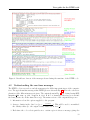
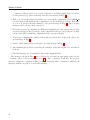
4.2 Understanding the run time messages . .
5 Program options
5.1 Main options . . . . . . . .
5.2 Field options . . . . . . . .
5.3 Region options . . . . . . .
5.4 Partition options . . . . . .
5.5 Padding options . . . . . . .
5.6 Density computation options
5.7 Redshift cone options . . . .
2
.
.
.
.
.
.
.
.
.
.
.
.
.
.
.
.
.
.
.
.
.
.
.
.
.
.
.
.
.
.
.
.
.
.
.
.
.
.
.
.
.
.
.
.
.
.
.
.
.
types
. . . .
. . . .
. . . .
.
.
.
.
.
.
.
.
.
.
.
.
.
.
.
.
.
.
.
.
.
.
.
.
.
.
.
.
.
.
.
.
.
.
.
.
.
.
.
.
.
.
.
.
.
.
.
.
.
.
.
.
.
.
.
.
.
.
.
.
.
.
.
.
.
.
.
.
.
.
.
.
.
.
.
.
.
.
.
.
.
.
.
.
.
.
.
.
.
.
.
.
.
.
.
.
.
.
.
.
.
.
.
.
.
.
.
.
.
.
.
.
.
.
.
.
.
.
.
.
.
.
.
.
.
.
.
.
.
.
.
.
.
.
.
.
.
.
.
.
.
.
.
.
.
.
.
.
.
.
.
.
.
.
.
.
.
.
.
.
.
.
.
.
.
.
.
.
.
.
.
.
.
.
.
.
.
.
.
.
.
.
.
.
.
.
.
.
.
.
.
.
.
.
.
.
.
.
.
.
.
.
.
.
.
.
.
.
.
.
.
.
.
.
.
.
.
.
.
.
.
.
.
.
.
.
.
.
.
.
.
.
.
.
.
.
.
.
.
.
.
.
.
.
.
.
.
.
.
.
.
.
.
.
.
.
.
.
.
.
.
.
.
.
.
.
.
.
.
.
.
.
.
.
.
.
.
.
.
.
.
.
.
.
.
.
.
.
.
.
.
.
.
.
.
.
.
.
.
.
.
.
.
.
.
.
.
.
.
.
.
.
.
.
.
.
.
.
.
.
.
.
.
.
.
.
.
.
.
.
.
.
.
.
.
.
.
.
.
.
.
.
.
.
.
.
.
.
.
.
.
.
.
.
.
.
.
.
.
.
.
.
.
.
.
.
.
.
.
.
.
.
.
.
.
.
.
.
.
.
.
.
.
.
.
.
.
.
.
.
.
.
.
.
.
.
.
.
.
.
.
.
.
.
.
.
.
.
.
.
.
.
.
.
.
.
.
.
.
.
.
.
.
.
.
.
.
.
.
.
.
.
.
.
.
.
.
.
.
.
.
.
.
.
.
.
.
.
.
.
.
.
.
.
.
.
.
.
.
.
.
.
.
.
.
.
.
.
.
.
.
.
.
.
.
.
.
.
.
.
.
.
.
.
.
.
.
15
15
15
16
17
17
18
19
20
20
21
21
22
22
23
23
23
24
.
.
.
.
26
26
26
30
33
.
.
.
.
.
.
.
35
35
36
37
38
39
40
42