1
INSTALLING THE USB DEVICE DRIVER
NOTE
The following installation description may vary on different operating systems
The necessary driver files are located on the product CD which is included in the product package.
Please brows on the CD to the directory ..\smartScanndyUSBDridver and open the directory for
the operating system of your PC. Inside that directory you can find a self extracting archive which
contains the driver software.
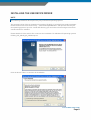
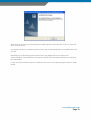
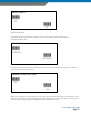
Please double click the archive file to execute the installation. For Windows XP operating systems
CP210x_VCP_Win2K_XP_S2K3Setup.exe
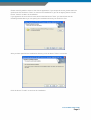
Click the button “Next” to continue the installation
smartSCANNDY USER GUIDE
Page 8