1
UsingtheMENUSystem
UsingtheMENUSystem
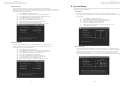
Wake-up Timer
4. System Setup
From here you can setup Time Zone, Auto power off, Factory Reset and check up the
HD STB's system information
You can setup the Wake-up Timer for automatic turn on the HD-STB.
When the setting up time is reached, the HD-STB will automatic turn on and display
setting up channel. This Wake-up Timer is operating daily. You can refer current
time upper side right of the OSD.
1)
2)
3)
4)
5)
6)
7)
8)
9)
Time Zone
From here you can setup the Time Zone. You should select the time zone
information after factory Reset. It is for correct time display when EPG information
is displayed.
Press MENU to display the menu.
Press DOWN to select the Access & Timer Setup menu.
Press OK or RIGHT to select Access & Timer Setup menu.
Press DOWN to select Wake-up Timer menu.
Press OK or RIGHT to go to Sub menu.
Press UP or DOWN button enabling sub menu.
Use UP/DOWN or numeric button to change time.
Press LEFT or RIGHT to move each item.
After finished setup, press MENU or LEFT to go back.
1)
2)
3)
4)
5)
6)
7)
Press
Press
Press
Press
Press
Press
Press
MENU to display the menu.
DOWN to select the System Setup menu.
OK or RIGHT to select System Setup menu.
OK or RIGHT to enter sub menu.
UP or DOWN to select Time Zone.
OK or RIGHT to change Time Zone where you lived.
MENU to go back.
'
Power-off Timer
You can setup the Power-off Timer for automatic turn off the HD-STB.
When the setting up time is reached, the HD-STB will automatic turn off.
This Power off Timer is operating daily.
1)
2)
3)
4)
5)
6)
7)
8)
9)
Press MENU to display the menu.
Press DOWN to select the Access & Timer Setup menu.
Press OK or RIGHT to select Access & Timer Setup menu.
Press DOWN to select Power-off Timer menu.
Press OK or RIGHT to go to Sub menu.
Press UP or DOWN button enabling sub menu.
Use UP/DOWN or numeric button to change time.
Press LEFT or RIGHT to move each item.
After finished setup, press MENU or LEFT to go back.
25
Auto Power Off
This HD-STB has Auto Power Off - Power Saver function. If you setup the Auto
Power Off - Power Saver with period of times, then this HD-STB will automatically
turn off after preset period of time in case of none remote control activity for
prevent unwanted operation. Prior to turn off, a pop-up menu will warns of
impending HD STB power down. If you setup to Off, then this function will disable.
26