1
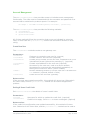
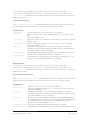
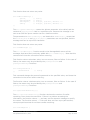
Parameters:
userId
messageType
timezone
broadcast
broadcastFields
timestampBegin
timestampEnd
UID of the user to be reported on. (required)
Kind of messages to report on. 'S' for sent or 'R' for received.
(optional, default is 'S').
Timezone identifier (e.g. America/Los_Angeles). Timezone
identifiers use the PHP timezone format, which is case-sensitive.
(optional, default is set in Manager).
Whether to show broadcast messages for a single broadcast or
all broadcasts. 'ALL' is used to show messages for all broadcasts.
A broadcast URN is used to show messages for a specific
broadcast (optional, default is 'ALL').
An array of fields that should be reported. (optional)
Timestamp for the beginning of the range to reporting on. The
format is 'YYYY-MM-DD HH:MM:SS'. (optional)
Timestamp for the beginning of the range to reporting on. The
format is 'YYYY-MM-DD HH:MM:SS'. (optional)
Return value:
If the API call is successful, this method returns a string containing CSV-formatted
data. If the call is unsuccessful, this method will return NULL and set an internal error
code. The getLastError() method can be used to retrieve a error string that can be
used to diagnose the error.
Customer Reporting (CSV)
The showCsvReportForCustomer method returns a string containing a CSVformatted report of all of the messages sent or received for a user over a given
period.
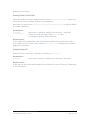
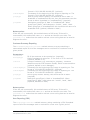
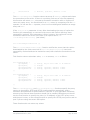
Parameters:
customerId
messageType
timezone
timestampBegin
timestampEnd
ID of the customer to be reported on. (required)
Kind of messages to report on. 'S' for sent or 'R' for received.
(optional, default is 'S').
Timezone identifier (e.g. America/Los_Angeles). Timezone
identifiers use the PHP timezone format, which is casesensitive. (optional, default is set in Manager).
Timestamp for the beginning of the range to reporting on. The
format is 'YYYY-MM-DD HH:MM:SS'. (optional)
Timestamp for the beginning of the range to reporting on. The
format is 'YYYY-MM-DD HH:MM:SS'. (optional)
Return value:
If the API call is successful, this method returns a string containing CSV-formatted
data. If the call is unsuccessful, this method will return NULL and set an internal
error code. The getLastError() method can be used to retrieve a error string that
can be used to diagnose the error.
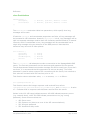
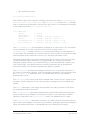
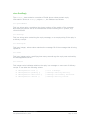
Troubleshooting
MessageMedia – PHP API Documentation
Last Updated October 8, 2012
Page 21 of 28