1
PART 4.2
Category – Materials, (an Advanced Feature)
Why Set up Categories?
Materials, Tasks and Work Items can be designated a Category code.
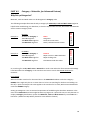
Example 2-
Doors
Hang Door
Decorative Front Door
Hardy’s Colonial Entrance Door
PLUMBER
Assume the Category is:
The Task might be:
The Work Item might be:
The Materials might be:
Cisterns
Repair Cistern in Main Bathroom
Repair leaking inlet
Fluid Master Side Inlet Valve
Category CISTERNS
Example 1 -
BUILDER
Assume the Category is:
The Task might be:
The Work Item might be:
The Materials might be:
Category DOORS
The following examples illustrate the why a Category for Materials, Tasks and Work Items might be
helpful when establishing your data base, so that the System links the Task, Work Item and Materials
with a common Category Code.
So, searching for a Task, Work Item or Materials is much easier when the aforementioned headings
have been linked to a Category, as the user does not have to search the ENTIRE database for
materials.
For example:
When the builder searches for the actual door in his Materials database under the Category –
DOORS, there might only be six or seven doors in his list. So searching for the door and adding it to
the Job, is quick and simple! The same applies as he searches for his Task, Work Item and Materials
under the DOORS Category
Setting up Categories is not an essential requirement of establishing the data base. However in the
event that a Materials data base might become very large over a period of time, an early decision to
employ a Category classification system for Materials, Tasks and Work Items may assist Users at a
later date. (JobStream Help will be pleased to assist with this feature)
18